Showing posts with label unity. Show all posts

Sunday, November 6, 2011

Debian Beckons Ubuntu Refugees to Come Home

Debian Live desktop
Dissatisfaction continues over Ubuntu's choice of the Unity Interface as default and, in the most recent release, no obvious way to return to the old Gnome desktop.

Long time Ubuntu users have been complaining loudly about Unity's lack of stability, limited options and an overall unfinished feel.

Distros that have watched Ubuntu gobbling up the Linux mind-share are suddenly getting a second look by unhappy Ubuntu users seeking alternatives to Unity.

Ubuntu started life as a simplified Debian with an emphasis on desktop usability. Recent Ubuntu releases seem focused on blazing their own trail toward a touchscreen, cloud enabled, widget driven environment. This may prove to be a very forward thinking plan, but it leaves traditional Gnome users hungering for their familiar desktop environment.

I decided to take another look at Ubuntu's parent, Debian. They offer live cd/dvds so I downloaded the i386 dvd .iso of the current stable release 6.0, aka 'Squeeze'. (All the Debian releases are named after characters from the 'Toy Story' movies.)

As a test machine, I scrounged up an ancient Dell Inspirion 1150. This dinosaur sports a 30 GB harddrive, 2.6 GHz processor, Wifi and 512  MB of RAM. Although I love my bling, I did not test compiz on this box due to the low specs.

Debian calls itself "The Universal Operating System" and nothing beats its support for a wide variety of hardware and architectures. Sound, video and ethernet were configured and worked automagically from the live cd.

Clicking the Install icon opens a graphical installer which walks the user through the usual steps: language, location, keyboard and timezone. Enter user and administrator passwords, computer and host names.

The partitioner offers a simple, guided install for a range of configurations. More advanced setup options are available by selecting 'Manual' install. The installation is essentially the same as most gnome-gui based installers and virtually painless.

The desktop is plain, vanilla Gnome 2 with a cartoonish space wallpaper (see above). There are many more wallpapers included by default and Ubuntu users will recognize many beautiful favorites, including 'Cosmos' the space slide show.

Live Earth Wallpaper on Debian/Gnome2
I replaced the default background with a Live Earth wallpaper that updates hourly throughout the day. You can find installation instructions here.
 
Neither ethernet or wifi would work after install. A quick google search found this documented bug and fix. Apparently, networking auto-configure is disabled by default.

I edited (as root) /etc/NetworkManager/NetworkManager.conf to show managed=true and following a restart of network manager, ethernet finally connected.

This Dell machine uses an old Broadcom wireless chipset, notoriously difficult to get working due to the closed nature of their firmware. Thankfully, in September of 2010, Broadcom finally began offering fully open Linux drivers for their chipsets.

Per instructions here, I entered in a terminal: sudo apt-get install firmware-b43-installer .Following a reboot, my wireless network was located and after entering my password, I was online in seconds.

I updated my repositories to include non-free software packages  Replace 'Squeeze' with 'Testing' for more current software updates, but slightly more breakage. Upgrades are incremental or 'rolling.' No need to reinstall every six months.

Debian uses apt for package management, with Synaptic as the familiar front end. Update manager notifies you of available updates and the Software Center makes adding and removing applications easy.

Debian came with gnash, the open implementation of Adobe Flash, installed by default. If you prefer Adobe's version, it is available in the repositories.

User friendly distros like Ubuntu and Mepis were built on Debian's stability, massive software repositories and superior apt package management system. Debian may lack the polish of these derivatives, but it is also a blank canvas, ready to take on your own look and feel. Experiment with new themes, icon sets, wallpapers and more at gnome-look.org

I was pleasantly surprised at the improvements in usability and ease of installation in Debian. Gnome2 seems as comfortable and familiar as an old pair of slippers. I think I will give Debian another try as a Desktop OS and it feels surprisingly good to come home.

A full review of Debian Squeeze can be found here.

Article first published as Debian Beckons Ubuntu Refugees to Come Home on Technorati.

Monday, September 19, 2011

A First Look at Ubuntu 11.10 Beta 1


o·nei·ric :   [oh-nahy-rik] adjective: of or pertaining to dreams.
oc·e·lot :   [os-uh-lot, noun: a spotted leopardlike cat 

from Dictionary.com
Ubuntu 11.10 desktop
Canonical recently released the first beta of Ubuntu 11.10, Code named Oneiric Ocelot. Ubuntu has ditched Gnome Shell completely and stepped up its committment to the Unity Desktop. As the final release approaches, just one month from today, we spin up this beta and take a first look at the distro that Mark Shuttleworh called, "part daydream, part discipline." 
The Oneiric Ocelot

In his blog, "Here be Dragons", Mark Shuttleworth explains the meaning of this releases codename:
"Oneiric means “dreamy”, and the combination with Ocelot reminds me of the way innovation happens: part daydream, part discipline."
03/07/2011
Canonical released the first Beta of Ubuntu 11.10, code named Oneiric Ocelot on September 2.
Unity is the default desktop, the classic Gnome Shell is not included in this release. Oneiric will use Unity 2D as the fall back mode.
The DVD has been slimmed down to 1.5 GB and includes language packs and popular applications including Inkscape, GIMP, Pitivi and a more comprehensive LibreOffice Suite.
The CD image is still available and all the DVD included applications are available through the repositories.

Gwibber
New software additions:
  • Thunderbird: New default email client
  • Déjà Dup: New backup tool, easily uploads backups to UbuntuOne.
  • Gwibber: Chat client, with new interface. Integrates easily with Facebook and Twitter.
Other changes in Oneric:
  • Gnome: Now uses the unstable 3.1.5 version. Eventually moving to 3.2
  • LightDM: New Display Manager which replaces GDM. LightDM is simpler to maintain, faster, more flexible and can be shared with Kubuntu and Xubuntu, each with a customized greeter.
  • Software Center
    Software Center: New interface with "Top Rated" views in all catagories and subcatagories, edit and delete your own reviews, and speedier installation of standalone .deb files (with gdebi). The new software center is easier to use and lists all available software, even packages which aren't in your current repositories, offering to add the repository if needed.
  • The kernel is based on v3.0.3 which boasts mulitple improvements, including more Atheros, Ralink, and iwlagn NIC drivers.
  • Ubuntu Core: A new minimal root file system for creating specialized images and an aid for developer projects.
  • GNU toolchain: Now based on GCC 4.6 for i386, AMD64 and ARM OMAP3/OMAP4 architectures.

I downloaded the torrent for the i386 DVD and used UNetbootin to set up a live flash drive to test this release.
Booting seemed slow, but sound, video and wireless all worked out of the box*. It still amazes me how far the Linux community has come toward making hardware detection and configuration virtually painless in most new installs.
Unity feels faster and more polished. The launcher is docked on the left side of the desktop. It lists icons for:
  • Dashboard
    Dash home (Dashboard)
  • Install Ubuntu 11.10
  • Home Folder
  • Firefox
  • LibreOffice Writer
  • LibreOffice Calc
  • LibreOffice Impress
  • Ubuntu Software Center
  • Ubuntu One
  • Workspace Switcher
  • Trash

Additional icons are added for open programs and files and these are added to the bottom of the launcher in a 'stack'. This keeps icons for open projects in your view no matter how many you are working on.
Adding or Removing icons from your launcher is as simple as a right click to select or de-select 'Keep in Launcher'.

Clicking on the Dashboard icon, brings up a window with shortcuts to Media Apps, Internet Apps, More Apps and Find Files. Below is another row of icons for Firefox, View Photos, Check EMail and Listen to Music.
This window needs considerable work as the only shortcut that worked was the Firefox icon. The layout did not size correctly for my screen and the last items in the rows were truncated.
'Stripes' Wallpaper
The default wallpaper is the same as in Natty, but according to this post, the new default wallpaper will be blue 'Stripes', (see image above) same as the default in Gnome 3. 'Stripes' was not included with this beta.
The top panel shows icons for network manager (animated as it connects), broadcast menu, power level (which stubbornly stuck at .37% power), clock (which I had to set manually, even after selecting my time zone) and a chat client with an odd [Invalid UTF-8] message (a known bug).

The last icon is a combination of power and settings. The menu includes System Settings, Display, Startup Applications, Updates Available, Attached Devices, Printers, Webcam and the Lock Screen/Log Out/Suspend/Shut Down options.
Appearance Settings
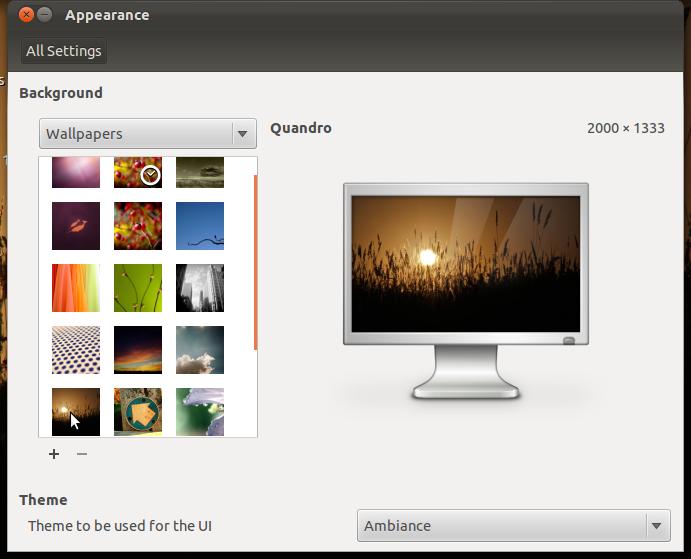
The Appearance window is simplified. Gone are options for customizing your theme. No more tweaking colors, controls, window borders, icons or pointers. Select a basic theme from a drop down menu.
Firefox Beta 7 is included in this release and I found it buggy with Adobe Flash 10. The Software Center crashed while trying to install Flash and even after a successful install, it repeatedly crashed Firefox when trying to load a video.
Some fonts don't render properly in some programs. This may be an upstream problem because I saw a similar bug after a recent Debian update.
Overall, this release is significantly buggier than previous Ubuntu betas I have tested. With Gnome Shell no longer included, Canonical has demonstrated its commitment to Unity on the desktop. The final beta is due to be released on September 22 and the Official Release date is scheduled for October 13.
According to Mark Shuttleworth, Oneiric Ocelot is built on daydreams and discipline and with this upcoming release, Canonical continues to lead the way into the future of Linux desktop innovation
For more information on Ubuntu 11.10 Beta 1, visit the Ubuntu Oneiric Ocelot Wiki.
Hardware specs:
  • Asus eeepc 900
  • 16 + 4 GB SSD
  • 2 GB RAM
  • 900 MHz Celeron Processor
  • Atheros AR5001 wireless adapter
  • Intel 915GM Graphics Controller
This article was originally published Sept 14, 2011 in UbuntuManual.org  

    Sunday, July 31, 2011

    Moving from Ubuntu to Linux Mint, Debian Edition

    Linux Mint Debian Edition
    Ubuntu has been as my primary Linux distro since Breezy Badger hit distrowatch in 2005. As a loyal Debian user, I loved the concept of an easy to use Deb, geared toward the desktop. I am far from a 'newbie', having used Linux since 1999. Contrary to myth, power users want simplicity too. We like it when our hardware "just works" or when an upgrade goes flawlessly. Yes, we can often fix things when they go wrong, but we prefer to spend our late nights working on projects we are interested in, rather than just getting our wireless card or sound to work. This ease of use, with the power of Debian just below the surface, has kept me loyal to Ubuntu through the years.

    Now things are changing at Ubuntu. I understand the reasons and respect the work that Canonical and Mark Shuttleworth have done. No one can doubt the huge contribution they have made to the Linux world.

    Mint Menu
    I will leave the debate over Unity vs Gnome, button placement and compatibility with Debian repositories and file structures to others. But, as Ubuntu moves more in its own direction and away from its Debian roots, I find myself again looking for an alternative which still feels like Deb, but includes a polished desktop, multimedia codecs, drivers for popular hardware and a sensible software library. These are the same reasons I tried Ubuntu way back when and are the reasons I recently took the first steps away from Ubuntu and installed Linux Mint, Debian Edition on my netbook.*

    I downloaded the dvd image and used unetbootin to load the .iso to my flash drive. Instructing my bios to boot from USB, the live desktop loaded without a hitch. In just a few minutes, I was booted into an elegant UI (see at top), with a very usable slab menu (mint menu) instead of the traditional Gnome Application, Places and System drop down menus. The chimes at startup told me my sound card had been loaded and was working properly.

    Compiz works smoothly
    A pop up message informed me that my wireless  network was available and after entering my password, it logged in and I was online, painlessly. YouTube videos played out of the box. A simple fix located on the Mint Debian webpage got the touch pad working quickly, including two finger scrolling and right click. Compiz was enabled and in a few clicks my wobbly windows and desktop cube were working smoothly.

    Exploring the main menu, I located a nice Software Manager which offered packages listed in searchable categories with reviews and screen shots. Very nice. Also available was the familiar Synaptic Package Manager, which I had heard was removed from Linux Mint. Not true.

    Software Manager
    An icon in the lower right corner informed me there were updates available from the Mint repositories but these failed with a complaint about broken packages.  However, running apt-get via the terminal allowed me to update/upgrade without a problem. This is fine with me as I prefer Synaptic and apt-get to the Mint Upgrade Tools and the documentation states it is fully compatible with Debian repositories. However, this may be a problem for new users.

    I like this Debian derivative and plan to keep it on my netbook. Eventually, I plan to replace Ubuntu with it on my desktop as well. For now, I am enjoying exploring this minty Debian which may be just the flavor I was looking for.

    *Hardware specs:
    Asus eeepc 900
    16 + 4 GB SSD
    2 GB RAM
    900 MHz Celeron Processor
    Atheros AR5001 wireless adapter
    Intel 915GM Graphics Controller