Showing posts with label ubuntu 11.10 beta. Show all posts

Monday, September 26, 2011

Hands On With Xubuntu 11.10 Beta

Xubuntu 11.10 Beta 1 Desktop
On September 2, Canonical released beta versions of Oneiric Ocelot for Ubuntu, Kubuntu and Xubuntu.  This is the third article in a series looking at these newest releases. Today we focus on Xubuntu, the lightweight Ubuntu, designed for older computers or those that just want a fast distro with a comprehensive software collection that is easy on system resources.

I downloaded the .iso from here. You can pick between Desktop and Alternate Install CDs, with choices for x86 PCs and 64 bit PC (AMD 64) versions.

Using UNetbootin, I loaded the image to my flash drive and booted into the Xubuntu desktop.

This version uses XFCE 4.8.3 with the Thunar file manager which now supports remote shares browsing and an eject button for removable devices.

The panel has had numerous improvements, including positioning, transparency, an item editor and the ability to create launchers with drag and drop.

The new desktop uses these panel upgrades to create a customized bottom panel which resembles Docky or Cairo Dock in appearance but without the animations or advanced options.

The top panel is similar to the one used in Ubuntu, but sports a small icon on the left which opens the main menu for applications and system settings.

Software Center
Xubuntu comes loaded with a complete software library for most common computing tasks. The included applications and utilities are generally lighter with fewer options than the software included in Ubuntu or Kubuntu but all alternatives are available in the repositories.

Synaptic Package Manager is included along with the Ubuntu Software Center. Using the new Software Center, you can browse by general category or search by name or task. Choosing the right application is easy screenshots and  reviews and ratings from other users.
gThumb Picture Viewer

The new software center provides reviews, ratings, and screenshots from other Ubuntu users. Unfortunately, the Software Center seems to still be rather buggy as it crashed several times as I attempted to install packages. This felt very similar to problems I noticed in Ubuntu 11.10 beta, using the Unity interface.

Kubuntu includes gThumb, a simple picture viewer, but also GIMP for more advanced image editing.

Thunar File Manager
gMusicbrowser is the default music player. It is a simple, easy to use player with many of the features found in heavier programs.

Plugging in an Android phone, Xubuntu recognized it as a USB storage device and launched the Thunar File Manager. I was able to move files easily between phone and computer. It did not recognize the file types or offer to open a picture viewer or music player.

Abiword and Gnumeric are included for Office applications. Both are lightweight but surprisingly full featured programs. Save files in open or proprietary formats, including pdf and MS .doc and .xls file types.

Thunderbird Email Reader

Thunderbird is the the default mail reader and it imported my mail and contacts without a hitch. Mozilla Thunderbird is a full-featured mail program with advanced search and filter capibilities. Tabbed email allows easy movement between multiple messages. Add-ons are quickly installed with the new Add-ons Manager, which provides descriptions, recommendations and pictures.

Onboard on-screen keyboard
Xubuntu now includes 'Onboard', an on-screen keyboard with a full qwerty keyboard, including function and other common keys. Click the orange area to the right to access the number pad and create 'snippets', macros which can be executed with a click.

Firefox 7.0 is included but repeatedly crashed, especially when accessing webpages using Flash. After several restarts, I was able to get Flash installed, despite the Software Center saying it was not available.

Gnome users may find this Desktop Environment slightly familiar, albeit less feature rich. I found it plagued by many of the same bugs I encountered in my review of the Ubuntu/Unity version of Oneiric. I experienced numerous crashes when using the Software Center, Firefox and even the Thunar file manager.

Xubuntu is the minimalist member of the Ubuntu family. It is a full featured distro, designed for those who prefer a fast, lightweight desktop environment, but be prepared for some frustration and bug reports if you decide to test this release.

Find more info at XFCE and Xubuntu Oneiric Ocelot beta1web sites.

*Hardware specs:
Asus eeepc 900
16 + 4 GB SSD
2 GB RAM
900 MHz Celeron Processor
Atheros AR5001 wireless adapter
Intel 915GM Graphics Controller

This article originally appeared at UbuntuManual.org on Sept 23, 2011.

Monday, September 19, 2011

A First Look at Ubuntu 11.10 Beta 1


o·nei·ric :   [oh-nahy-rik] adjective: of or pertaining to dreams.
oc·e·lot :   [os-uh-lot, noun: a spotted leopardlike cat 

from Dictionary.com
Ubuntu 11.10 desktop
Canonical recently released the first beta of Ubuntu 11.10, Code named Oneiric Ocelot. Ubuntu has ditched Gnome Shell completely and stepped up its committment to the Unity Desktop. As the final release approaches, just one month from today, we spin up this beta and take a first look at the distro that Mark Shuttleworh called, "part daydream, part discipline." 
The Oneiric Ocelot

In his blog, "Here be Dragons", Mark Shuttleworth explains the meaning of this releases codename:
"Oneiric means “dreamy”, and the combination with Ocelot reminds me of the way innovation happens: part daydream, part discipline."
03/07/2011
Canonical released the first Beta of Ubuntu 11.10, code named Oneiric Ocelot on September 2.
Unity is the default desktop, the classic Gnome Shell is not included in this release. Oneiric will use Unity 2D as the fall back mode.
The DVD has been slimmed down to 1.5 GB and includes language packs and popular applications including Inkscape, GIMP, Pitivi and a more comprehensive LibreOffice Suite.
The CD image is still available and all the DVD included applications are available through the repositories.

Gwibber
New software additions:
  • Thunderbird: New default email client
  • Déjà Dup: New backup tool, easily uploads backups to UbuntuOne.
  • Gwibber: Chat client, with new interface. Integrates easily with Facebook and Twitter.
Other changes in Oneric:
  • Gnome: Now uses the unstable 3.1.5 version. Eventually moving to 3.2
  • LightDM: New Display Manager which replaces GDM. LightDM is simpler to maintain, faster, more flexible and can be shared with Kubuntu and Xubuntu, each with a customized greeter.
  • Software Center
    Software Center: New interface with "Top Rated" views in all catagories and subcatagories, edit and delete your own reviews, and speedier installation of standalone .deb files (with gdebi). The new software center is easier to use and lists all available software, even packages which aren't in your current repositories, offering to add the repository if needed.
  • The kernel is based on v3.0.3 which boasts mulitple improvements, including more Atheros, Ralink, and iwlagn NIC drivers.
  • Ubuntu Core: A new minimal root file system for creating specialized images and an aid for developer projects.
  • GNU toolchain: Now based on GCC 4.6 for i386, AMD64 and ARM OMAP3/OMAP4 architectures.

I downloaded the torrent for the i386 DVD and used UNetbootin to set up a live flash drive to test this release.
Booting seemed slow, but sound, video and wireless all worked out of the box*. It still amazes me how far the Linux community has come toward making hardware detection and configuration virtually painless in most new installs.
Unity feels faster and more polished. The launcher is docked on the left side of the desktop. It lists icons for:
  • Dashboard
    Dash home (Dashboard)
  • Install Ubuntu 11.10
  • Home Folder
  • Firefox
  • LibreOffice Writer
  • LibreOffice Calc
  • LibreOffice Impress
  • Ubuntu Software Center
  • Ubuntu One
  • Workspace Switcher
  • Trash

Additional icons are added for open programs and files and these are added to the bottom of the launcher in a 'stack'. This keeps icons for open projects in your view no matter how many you are working on.
Adding or Removing icons from your launcher is as simple as a right click to select or de-select 'Keep in Launcher'.

Clicking on the Dashboard icon, brings up a window with shortcuts to Media Apps, Internet Apps, More Apps and Find Files. Below is another row of icons for Firefox, View Photos, Check EMail and Listen to Music.
This window needs considerable work as the only shortcut that worked was the Firefox icon. The layout did not size correctly for my screen and the last items in the rows were truncated.
'Stripes' Wallpaper
The default wallpaper is the same as in Natty, but according to this post, the new default wallpaper will be blue 'Stripes', (see image above) same as the default in Gnome 3. 'Stripes' was not included with this beta.
The top panel shows icons for network manager (animated as it connects), broadcast menu, power level (which stubbornly stuck at .37% power), clock (which I had to set manually, even after selecting my time zone) and a chat client with an odd [Invalid UTF-8] message (a known bug).

The last icon is a combination of power and settings. The menu includes System Settings, Display, Startup Applications, Updates Available, Attached Devices, Printers, Webcam and the Lock Screen/Log Out/Suspend/Shut Down options.
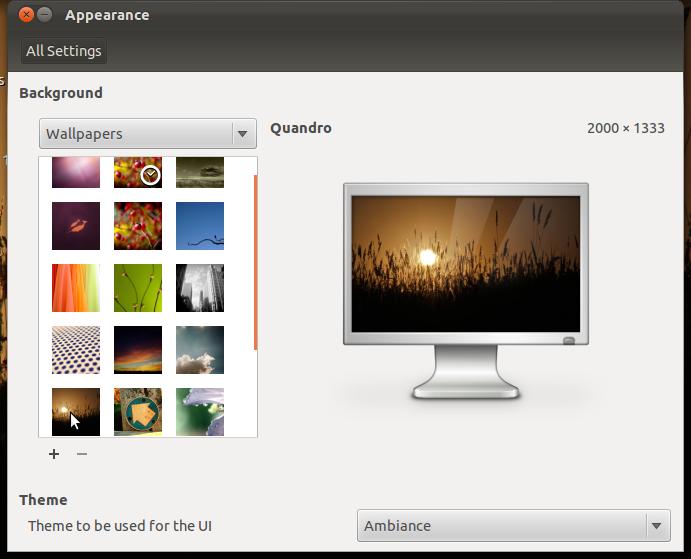
Appearance Settings
The Appearance window is simplified. Gone are options for customizing your theme. No more tweaking colors, controls, window borders, icons or pointers. Select a basic theme from a drop down menu.
Firefox Beta 7 is included in this release and I found it buggy with Adobe Flash 10. The Software Center crashed while trying to install Flash and even after a successful install, it repeatedly crashed Firefox when trying to load a video.
Some fonts don't render properly in some programs. This may be an upstream problem because I saw a similar bug after a recent Debian update.
Overall, this release is significantly buggier than previous Ubuntu betas I have tested. With Gnome Shell no longer included, Canonical has demonstrated its commitment to Unity on the desktop. The final beta is due to be released on September 22 and the Official Release date is scheduled for October 13.
According to Mark Shuttleworth, Oneiric Ocelot is built on daydreams and discipline and with this upcoming release, Canonical continues to lead the way into the future of Linux desktop innovation
For more information on Ubuntu 11.10 Beta 1, visit the Ubuntu Oneiric Ocelot Wiki.
Hardware specs:
  • Asus eeepc 900
  • 16 + 4 GB SSD
  • 2 GB RAM
  • 900 MHz Celeron Processor
  • Atheros AR5001 wireless adapter
  • Intel 915GM Graphics Controller
This article was originally published Sept 14, 2011 in UbuntuManual.org